20 ChatGPT Hairstyle Prompts to Try a New Look Before the Salon
20 ChatGPT hairstyle prompts for women and men: try a cut or color on your own photo, compare looks in a grid, then turn the winner into a salon brief.


On this page
- The Line Every Hairstyle Prompt Needs
- Women's Hairstyle Prompts (1 to 6)
- 1. Chin-length textured bob
- 2. Curtain bangs
- 3. Long layers
- 4. Pixie cut
- 5. Box braids or knotless braids
- 6. Wedding updo
- Men's Hairstyle Prompts (7 to 11)
- 7. Low or mid fade
- 8. Textured crop
- 9. Classic side part
- 10. Shoulder-length hair
- 11. Beard and cut together
- Grids and Side-by-Side Comparisons (12 to 14)
- 12. Nine cuts in a 3x3 grid
- 13. Before and after, 2x2
- 14. One cut, four colors
- Prompts by Hair Type and Color (15 to 18)
- 15. Curly hair
- 16. Fine or thin hair
- 17. Thick hair
- 18. Try a color before you dye
- Turn the Winner Into a Salon Brief (19 and 20)
- 19. Write the brief
- 20. Questions for the chair
- Using These in Gemini
- When the Result Looks Wrong
- Frequently Asked Questions
- Can ChatGPT show me a hairstyle on my own photo?
- Is there a ChatGPT hairstyle analysis prompt for my face shape?
- Why does ChatGPT change my face when I change the hair?
- Do these hairstyle prompts work in Gemini?
- Will my real hair look like the picture?
- Your Move
A ChatGPT hairstyle prompt lets you see a cut or a color on your own face before anyone picks up scissors. You upload a clear photo, tell the model to keep everything except the hair, describe the style, and two minutes later you're looking at yourself with a bob, a fade or copper waves. The 20 prompts below are copy and paste: change the words in brackets, keep the rest.
They're split the way people search: women's cuts, men's cuts, grids that show nine options at once, prompts by hair type, and two text prompts that turn the picture you like into a brief your stylist can act on. Every image prompt opens with the same line, and that line is the whole trick.
The Line Every Hairstyle Prompt Needs
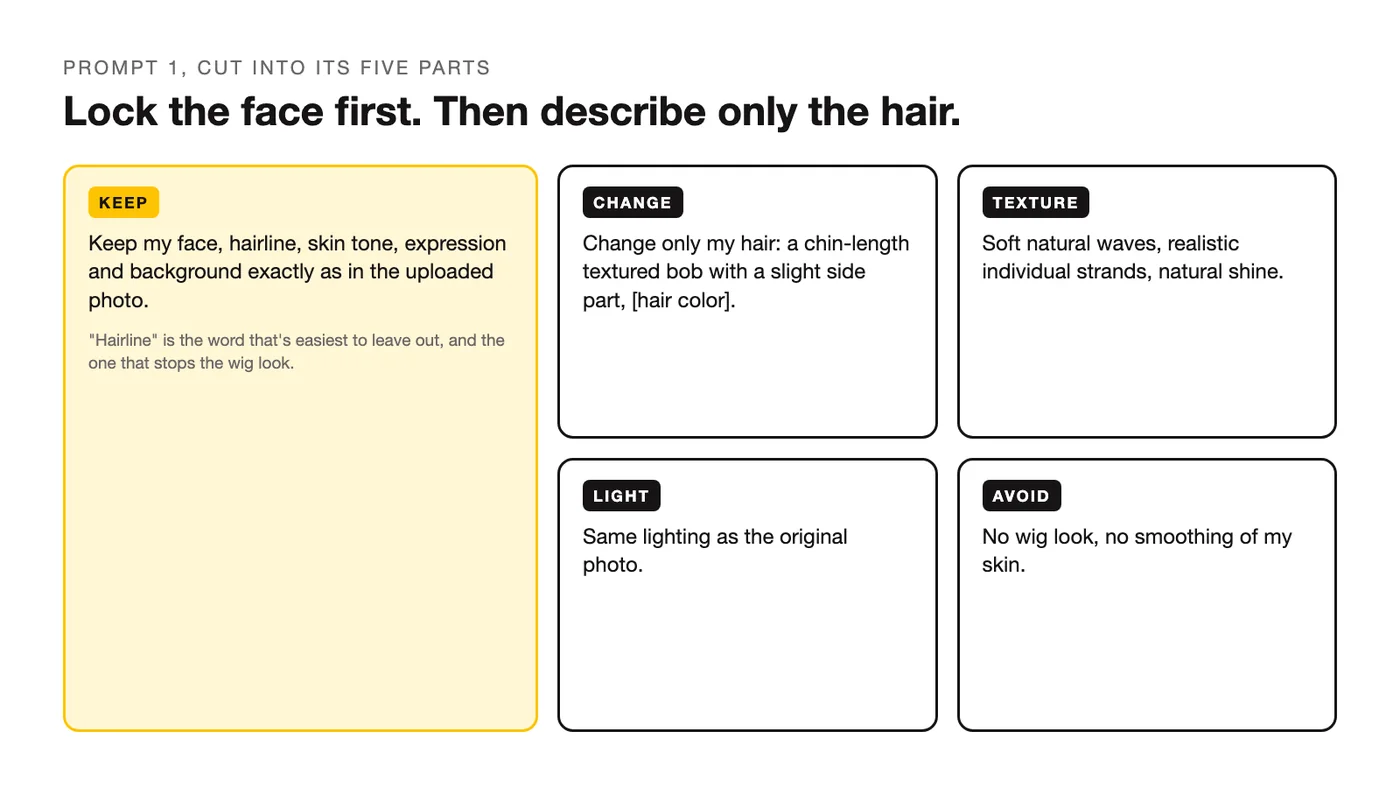
Change the hair and the model wants to change the face with it: a slightly younger jaw, smoother skin, a hairline that crept forward. OpenAI's notes on the current ChatGPT Images say the model keeps "facial likeness consistent across edits," which is why these prompts work on a photo of you at all, but it still does what it's asked, so ask for the face to stay. Source: new ChatGPT Images. The line that holds everything in place:
Keep my face, hairline, skin tone, expression and background exactly as in the uploaded photo. Change only my hair.Paste it first, then describe the hair. "Hairline" is the word that's easiest to leave out, and it matters: a new style drawn over a moved hairline looks like a wig, and the place to fix that is the prompt.
Women's Hairstyle Prompts (1 to 6)
A ChatGPT hairstyle prompt female readers can start with is the bob: a big change that's hard to picture and slow to grow out. All six keep your color unless you change the bracket.
1. Chin-length textured bob
The classic test cut. The strands line keeps it from looking like a helmet.
Keep my face, hairline, skin tone, expression and background exactly as in the uploaded photo. Change only my hair: a chin-length textured bob with a slight side part, soft natural waves, [hair color] with no visible roots. Realistic individual strands, natural shine, hair falls around my ears the way real hair would. Same lighting as the original photo. No wig look, no smoothing of my skin.2. Curtain bangs
Bangs look reversible and take months to grow out. Try them here first.
Keep my face, hairline, skin tone, expression and background exactly as in the uploaded photo. Change only my hair: add soft curtain bangs parted in the middle, cheekbone length, blending into my current length and color. The bangs sit on my forehead naturally with a little separation, not a solid block. Realistic strands, same lighting as the original. No change to my eyebrows or face shape.3. Long layers
For length you already have, cut differently.
Keep my face, hairline, skin tone, expression and background exactly as in the uploaded photo. Change only my hair: keep my current color and length, but recut it into long face-framing layers starting at the collarbone, with movement and lift at the crown. Natural texture, a few loose pieces around the face, realistic shine. Same lighting as the original. No change to my face.4. Pixie cut
The big one. Ask for the sides and the neck, or the model will guess.
Keep my face, hairline, skin tone, expression and background exactly as in the uploaded photo. Change only my hair: a soft pixie cut, longer on top with a side-swept fringe, tapered at the sides and the nape, [hair color]. Show my ears and neck as they are. Realistic texture, slight natural volume on top. Same lighting as the original. No change to my jawline or face.5. Box braids or knotless braids
Braids need their size and length named, or you get a random thickness.
Keep my face, hairline, skin tone, expression and background exactly as in the uploaded photo. Change only my hair: medium knotless box braids, waist length, [black / dark brown / honey blonde], with a clean natural-looking parting and edges laid softly. Realistic braid texture and weight, a few braids over the shoulder. Same lighting as the original. No change to my face or hairline.6. Wedding updo
For an event, with the dress out of the picture so the hair gets all the attention.
Keep my face, hairline, skin tone, expression and background exactly as in the uploaded photo. Change only my hair: a soft low chignon with a few loose face-framing tendrils and a little texture, hair pulled back from my face, [hair color]. Realistic strands and a natural finish, no plastic smoothness. Same lighting as the original. No change to my face, no accessories added.Men's Hairstyle Prompts (7 to 11)
A ChatGPT hairstyle prompt male readers can start with is the fade, and the fade prompt names the fade height. The beard prompt is last because beard and cut change together, and a prompt that does both at once gives you the real picture.
7. Low or mid fade
Name the height. "Fade" alone comes back different every time.
Keep my face, hairline, skin tone, expression and background exactly as in the uploaded photo. Change only my hair: a [low / mid] skin fade on the sides and back, with about 2 inches (5 cm) of textured length on top, swept slightly to one side, my natural color. Clean edges, realistic hair texture, same lighting as the original. No change to my beard, eyebrows or face.8. Textured crop
Short and brushed forward.
Keep my face, hairline, skin tone, expression and background exactly as in the uploaded photo. Change only my hair: a textured crop, about 1.5 inches (4 cm) on top brushed forward with a choppy fringe, sides tapered short, my natural color. Matte finish, realistic separation between pieces, same lighting as the original. No change to my face or hairline.9. Classic side part
The interview and wedding cut.
Keep my face, hairline, skin tone, expression and background exactly as in the uploaded photo. Change only my hair: a classic side part, about 3 inches (7.5 cm) on top combed to the [left / right] with a defined part line, sides tapered neatly, my natural color, light natural shine. Same lighting as the original. No change to my face or facial hair.10. Shoulder-length hair
The one that takes a year to find out about, previewed in a minute.
Keep my face, hairline, skin tone, expression and background exactly as in the uploaded photo. Change only my hair: grow it out to shoulder length, center parted, with natural wave and a little volume, tucked behind one ear, my natural color. Realistic weight and texture, same lighting as the original. No change to my face or beard.11. Beard and cut together
Both at once, because they're judged together.
Keep my face, hairline, skin tone, expression and background exactly as in the uploaded photo. Change my hair and beard: a mid fade with 2 inches (5 cm) of textured length on top, plus a short, neatly shaped beard about half an inch (1.3 cm) long with a defined cheek line and neckline, both in my natural color. Realistic hair and beard texture, same lighting as the original. No other change to my face.Grids and Side-by-Side Comparisons (12 to 14)
One picture at a time is slow. A grid shows nine cuts on one face, and the labels let you tell the model which one you want next. The names in prompt 12 are a starting list; swap in any you've seen on the way to work.
12. Nine cuts in a 3x3 grid
The fastest way to narrow down. Use the women's or men's list as you need.
Using my uploaded photo, make a 3x3 grid of the same photo with nine different men's haircuts: low fade, mid fade, textured crop, buzz cut, side part, quiff, curtains, shoulder-length, and man bun. Keep my face identical in every square. Label each square with the haircut name in small clean text at the bottom. Same lighting and angle in all nine.13. Before and after, 2x2
Your current hair next to three options, so the change is visible.
Using my uploaded photo, make a 2x2 grid: top left is my photo unchanged; the other three squares show me with [style 1], [style 2] and [style 3]. Keep my face, hairline and background identical in all four. Label each square with its style name in small clean text at the bottom. Same lighting and angle in all four.14. One cut, four colors
Settle the color question before the cut question.
Using my uploaded photo, make a 2x2 grid of me with the same [style name] in four hair colors: [color 1], [color 2], [color 3], [color 4]. Keep my face, hairline, skin tone and background identical in every square. Show realistic color with natural depth, no flat single tone. Label each square with the color name in small clean text at the bottom.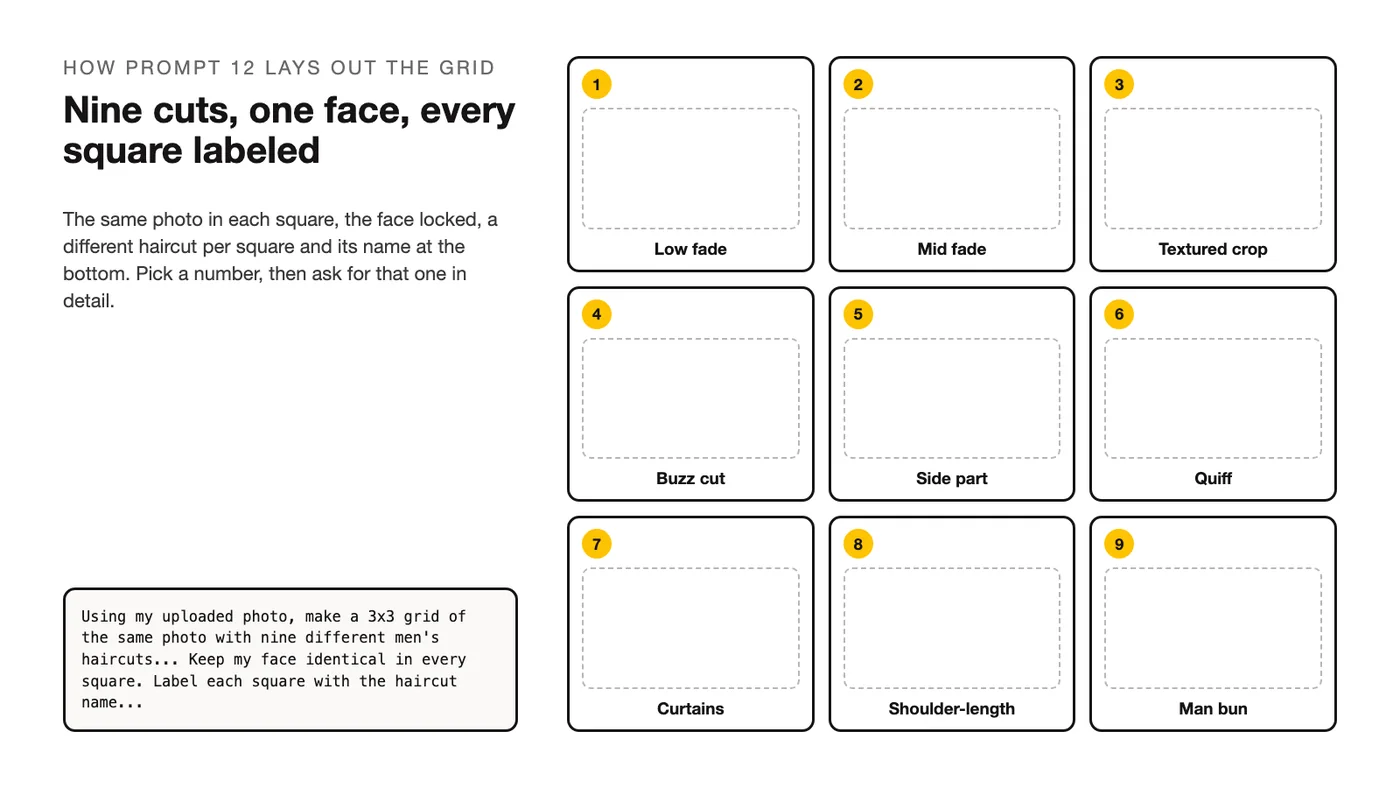
Prompts by Hair Type and Color (15 to 18)
A hairstyle drawn on straight, medium-thick hair says little about curls, fine hair or thick hair. These prompts tell the model what your hair actually does, and the last one tries a color on you before the dye does.
15. Curly hair
Curl pattern, shrinkage and volume named, so the cut is drawn on your hair, not someone else's.
Keep my face, hairline, skin tone, expression and background exactly as in the uploaded photo. Change only my hair, and keep my natural curl pattern as it is in the photo, including its volume and shrinkage. Show me with [a shoulder-length layered cut / a curly shag / a tapered cut with longer curls on top], my natural color. Realistic defined curls, no straightening, same lighting as the original.16. Fine or thin hair
The prompt asks for a style that works with fine hair, and tells the model not to invent density.
Keep my face, hairline, skin tone, expression and background exactly as in the uploaded photo. Change only my hair, and keep its real density: my hair is fine and on the thinner side, so don't add thickness that isn't there. Show me with [a blunt collarbone-length cut / a textured crop / a soft bob with minimal layering] in my natural color, styled for lift at the roots. Realistic strands, same lighting as the original.17. Thick hair
Thick hair needs weight taken out, and the prompt should show that rather than a solid mass.
Keep my face, hairline, skin tone, expression and background exactly as in the uploaded photo. Change only my hair, and keep its real thickness: my hair is thick and heavy. Show me with [long layers with internal thinning / a chin-length bob with weight removed underneath / a mid fade with textured length on top] in my natural color, with visible movement and separation rather than a single heavy shape. Same lighting as the original.18. Try a color before you dye
Keep the cut, change the color, and ask for the honest version with roots and depth. Which colors suit your coloring is its own question, answered by the ChatGPT color analysis prompts.
Keep my face, hairline, skin tone, expression, background and my exact current haircut as in the uploaded photo. Change only the hair color to [copper / ash blonde / espresso brown / burgundy], shown realistically: natural depth and dimension, slightly darker at the roots, the way it would look two weeks after coloring. Same lighting as the original. No change to my skin tone or eyebrows.Turn the Winner Into a Salon Brief (19 and 20)
A haircut prompt stops being useful the moment you're in the chair and can't describe what you saw. These two prompts are text only: the first turns the picture into measurements, the second into the questions that keep the result close to the picture.
19. Write the brief
Lengths in both units, because stylists think in whichever one their scissors are marked in.
I liked hairstyle number [N] from the grid. Write a short brief I can show my stylist: the cut name, length at the front, sides and back in inches and centimeters, layering, how to style it daily in under 10 minutes, and what to ask the stylist if my hair is [fine / thick / curly]. Keep it under 120 words.20. Questions for the chair
What to ask before the first cut, so the stylist can tell you where the picture and your hair will differ.
Based on the hairstyle I chose ([style name]) and my hair type ([fine / thick / curly / straight], [length], [color]), give me 5 questions to ask my stylist before they start, each one aimed at a way the real result could differ from the AI picture: density, texture, growth pattern, maintenance and how it grows out. One line per question, plain language.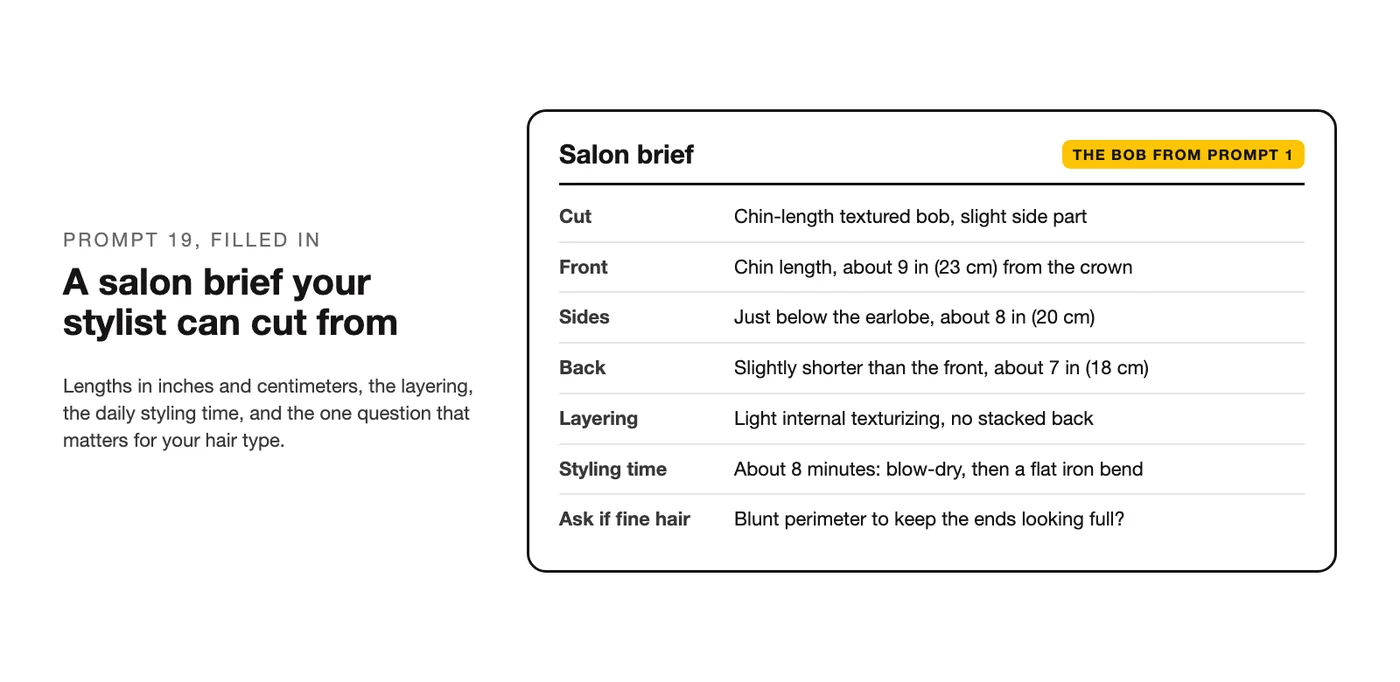
Using These in Gemini
A Gemini hairstyle prompt works the same way, with one change to the first line. Gemini edits uploaded photos, and its documentation lists keeping a person's appearance consistent as a feature of its image model. Our Gemini pages open with a slightly different sentence, so use that one here. Source: Gemini image generation. Replace the opening line with:
Keep the face from my uploaded photo exactly as it is: same features, same proportions, same skin tone, same hairline. Change only the hair.Then paste the rest of any prompt above. For prompts 12 to 14, ask for the labels "in small plain text" and run the prompt again if they come out garbled. There are more Gemini photo edits, sorted by job if you end up preferring it for this kind of work.
When the Result Looks Wrong
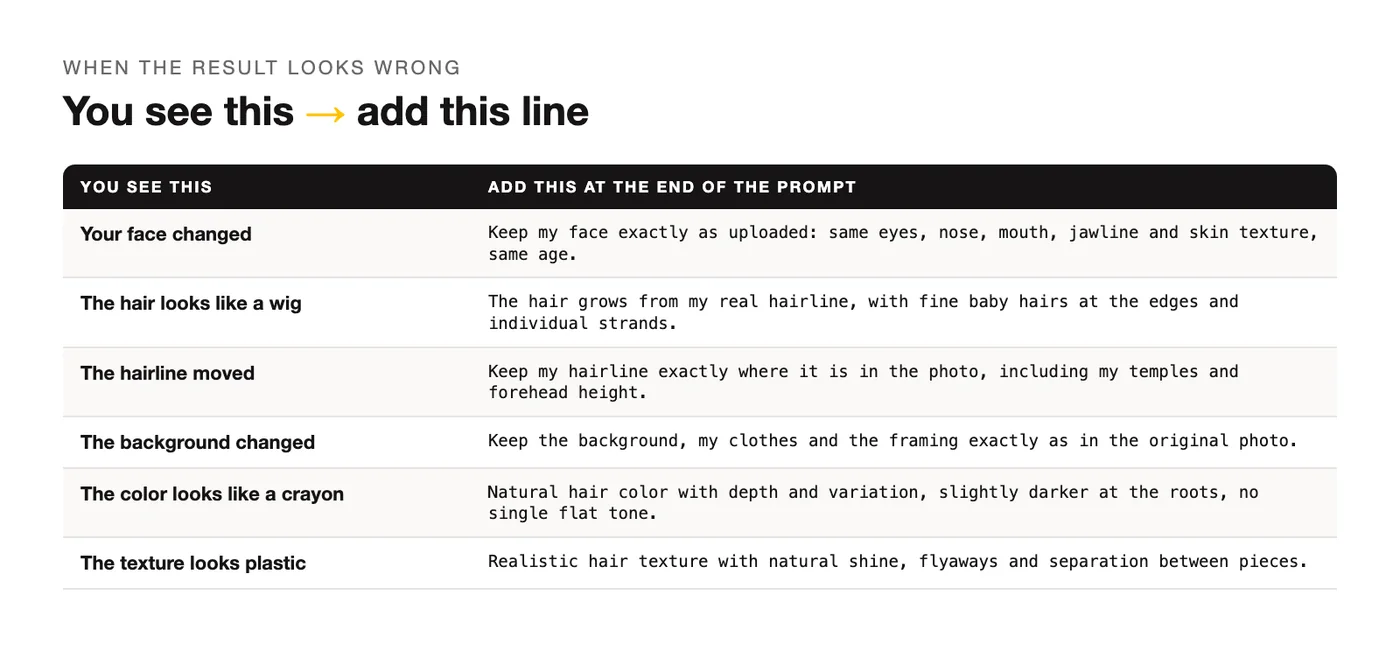
Six things go wrong often, and each one has a line that fixes it. Add the line to the end of the prompt and run it again without changing anything else.
| You see this | Add this |
|---|---|
| Your face changed with the hair | "Keep my face exactly as uploaded: same eyes, nose, mouth, jawline and skin texture, same age." |
| The hair looks like a wig | "The hair grows from my real hairline, with fine baby hairs at the edges and individual strands, not a solid shape." |
| The hairline moved forward or back | "Keep my hairline exactly where it is in the photo, including my temples and forehead height." |
| The background changed | "Keep the background, my clothes and the framing exactly as in the original photo." |
| The color looks like a crayon | "Natural hair color with depth and variation, slightly darker at the roots, no single flat tone." |
| The hair texture looks plastic | "Realistic hair texture with natural shine, flyaways and separation between pieces, matte where real hair would be matte." |
If the lighting on your face looks off after an edit, treat that as a separate job, and the prompts for fixing light and background handle it without touching the hair.
Frequently Asked Questions
Can ChatGPT show me a hairstyle on my own photo?
Yes. Upload a clear, front-facing photo in even light with your current hair visible, paste one of the prompts above, and ChatGPT returns the same photo with the hair changed. The first line of each prompt is what keeps it your photo rather than a photo of someone who resembles you: it tells the model to leave your face, hairline, skin and background alone and change only the hair.
Is there a ChatGPT hairstyle analysis prompt for my face shape?
There is, and it's a text prompt rather than an image one. Face-shape rules are a styling tradition, not a law, so ask for suggestions, not verdicts: "Here's my photo. Describe my face shape, hairline and hair texture in plain words, then suggest three cuts that would suit them and one I should be careful with, and explain each in a sentence." Then run the three suggestions through prompt 13 to see them on you.
Why does ChatGPT change my face when I change the hair?
Because "give me a bob" is a request to make a picture of a person with a bob, and the face is part of the picture. The model keeps likeness when it's asked to and can drift when it isn't, which is why every image prompt here opens with the keep line. If the drift persists, add "same age, same skin texture, no beauty retouching" to the end, and check that your original photo isn't already filtered, since the model treats a smoothed face as the face it has to keep.
Do these hairstyle prompts work in Gemini?
Yes, with the first line swapped for the Gemini version in the section above. The cut descriptions, the grid prompts and the salon brief prompts are the same. If a grid's labels come out garbled, ask for them again in small plain text.
Will my real hair look like the picture?
Close, with honest gaps. The picture doesn't know your hair's density, how it grows at the crown, or how it behaves in humidity, and it draws every style on hair that cooperates. That's what prompts 15 to 17 are for: telling the model your curl, your fineness or your thickness so the preview is drawn on your hair. The salon brief in prompt 19 and the questions in prompt 20 close the rest of the gap in the chair, where your stylist can tell you which parts of the picture your hair will do and which it won't.
Your Move
Run prompt 12 first and pick two squares. Then run those two through prompt 13 next to your current hair, and the one you keep looking at is the one to take to the salon with the brief from prompt 19. For other things ChatGPT can do with your photo, the same keep line applies.
Put this into practice: browse the portrait prompts in the God of Prompt library. Want all of it in one place? The Complete AI Bundle puts the whole prompt library, Custom GPTs and n8n workflow templates behind one payment, with lifetime access.
Prompts for this topic
Put this article to work with ready-to-use prompts from the God of Prompt library.
Keep reading

25 AI Birthday Photo Prompts for ChatGPT and Gemini
25 AI birthday photo prompts for ChatGPT and Gemini: portraits, milestone ages, kids, pets, couples and invitations, with cake text spelled right.

12 ChatGPT Color Analysis Prompts to Find Your Season
12 copy-paste ChatGPT color analysis prompts: find your season from a selfie or hex codes, build a palette, then double-check the result before you shop.
30 ChatGPT Christmas Photo Prompts That Keep Your Face (2026)
30 copy-paste ChatGPT Christmas photo prompts for portraits, family, couples, pets and cards, plus the one line that stops ChatGPT changing your face.

The best of the blog, in your inbox
One email when notable prompts, tools, and model updates land. No spam, unsubscribe anytime.
Join 100,000+ subscribers. One email a week, real prompts, tools, and model updates. Unsubscribe anytime.